What Is Workflow Automation in a Contact Centre?
How Power Shapes Works.
QUICK ANSWER
Workflow automation in a contact centre is the use of software to automatically execute tasks like updating a CRM, running a calculation, or syncing data at the exact step in a procedure where the action is needed. Power Shapes is Procedureflow's built-in workflow automation feature that does this from inside the procedure itself, with no platform switching required.
Every day, contact centre agents follow procedures that tell them exactly what to do but the moment an action is required, they leave the flow to do it. Open a CRM. Re-enter data. Switch to a billing system. Run a calculation. Come back. That gap between knowing what to do and doing it without leaving the procedure is where handle time hides, errors compound, and consistency breaks down. Process workflow automation solves this, and Power Shapes brings it directly inside Procedureflow.
What Is Workflow Automation in a Contact Centre?
Workflow automation is the use of software to execute tasks automatically at the right point in a process without requiring manual intervention from an agent. In a contact centre, this means actions like updating customer records, creating support tickets, running eligibility calculations, or syncing data from external systems happen automatically when a procedure reaches the step where that action belongs.
Unlike automation platforms that operate independently of your procedures, workflow automation built into Procedureflow executes at the step level the automation only fires when an agent reaches that point in the flow, in the right context, for the right reason.
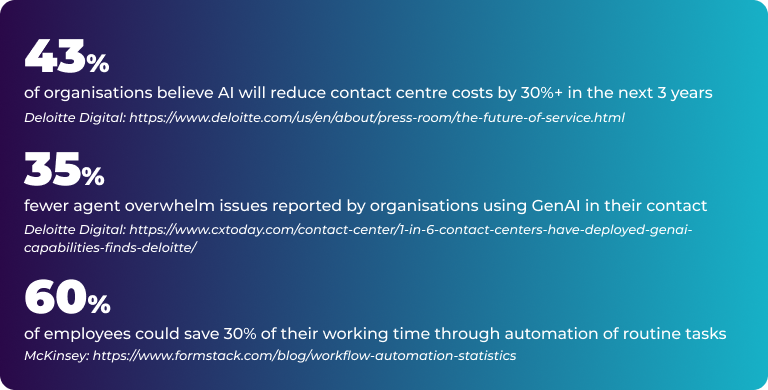
The most impactful workflow automation is rarely the most complex. It is the repetitive manual step your team works around every single day, the re-entry, the tab switch, the lookup. That is where Power Shapes starts.
What Is a Power Shape in Procedureflow?
A Power Shape is a custom automation shape embedded directly inside a Procedureflow procedure. It is built using JavaScript and React, uploaded to your Procedureflow environment, and installed by an Org Admin. Once deployed, it appears as a shape inside any flow at the exact step where an automated action needs to happen.
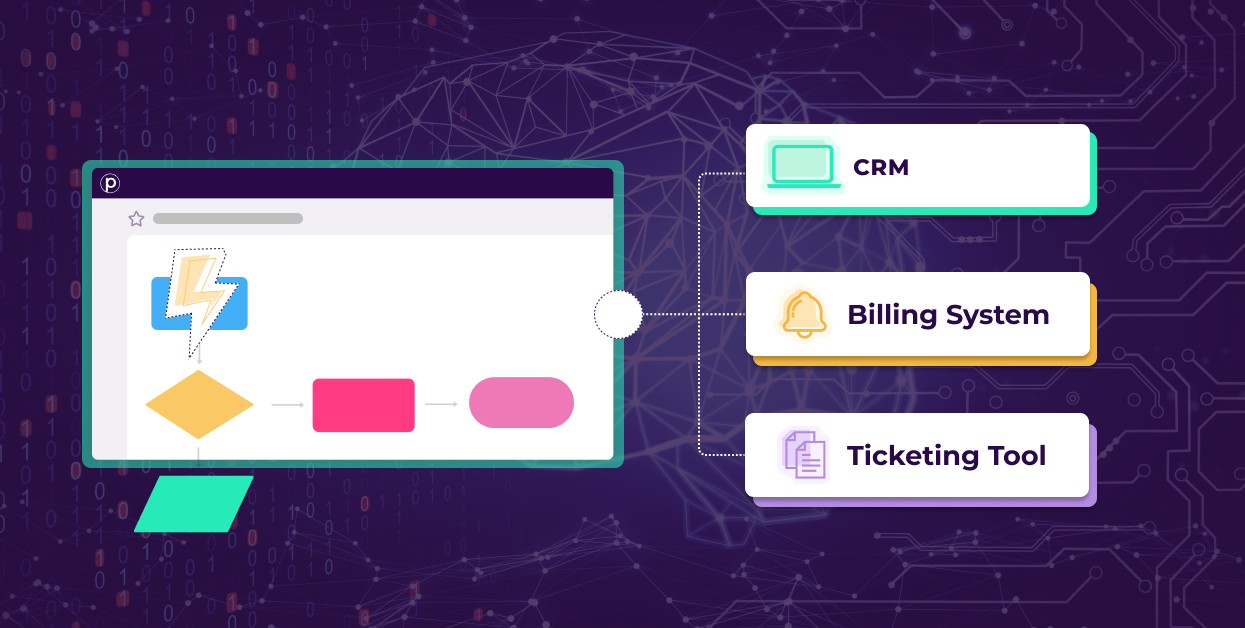
Power Shapes can connect to any external system that offers an API, enabling two-way data exchange between Procedureflow and your CRM, billing platform, ticketing tool, or other enterprise software. They can also function as self-contained tools such as calculators or decision logic that require no external connection at all.
A Power Shape is not a tool agents switch to. It is a capability that activates where they already are inside the procedure, at the step where it is needed.
A Power Shape is not a tool agents switch to. It is a capability that activates where they already are inside the procedure, at the step where it is needed.
From an agent's perspective, a Power Shape is invisible as a technical layer. They follow the procedure. They reach a step. The action happens. They move on. There is no new interface, no separate login, and no awareness that an API call was just made to their CRM.
Related Reading - Internal Links
→ What Is Process Workflow Automation and Why Is It Important
→ Automate your processes with Power Shapes
→ Integrate your existing systems and realize the power of visual knowledge
How Does a Power Shape Work Inside a Procedure?
The key is that the automation is embedded at the step level not running in a background system that agents trigger separately.

1. Agent reaches the Power Shape step
The shape sits at the precise point in the procedure where an action is needed for example, after a customer's account details have been confirmed.
2. The Power Shape activates and connects to the external system via API
The shape sends or retrieves data from the connected platform in real time, a CRM update, a ticket creation, a balance lookup, or a calculated result.
3. The result is displayed inside the procedure
The confirmation, data, or calculated value appears within the flow. The agent sees what they need, where they are.
4. The procedure continues without interruption
No tab switch. No re-entry. No lost context. The agent moves to the next step having completed the action without leaving Procedureflow once.
How Does Power Shapes Connect Two Platforms?
Power Shapes connect to external platforms using APIs, the standard protocol modern enterprise software uses to communicate. If a system has an API endpoint, a Power Shape can send and receive data from it.
What is an API, in Plain Terms?
An API (Application Programming Interface) is a secure communication bridge between two software systems. If Platform A needs to send or receive data from Platform B, it uses the API to do so. Most enterprise platforms CRMs, billing systems, ticketing tools offer API endpoints.
Without Power Shapes, an agent in Procedureflow who needs to update a Salesforce record has to open Salesforce, navigate to the right record, and enter the data manually. With a Power Shape, Procedureflow sends the update to Salesforce automatically the agent sees the confirmation in their procedure and never opens a second tab.
Three real-world integration examples
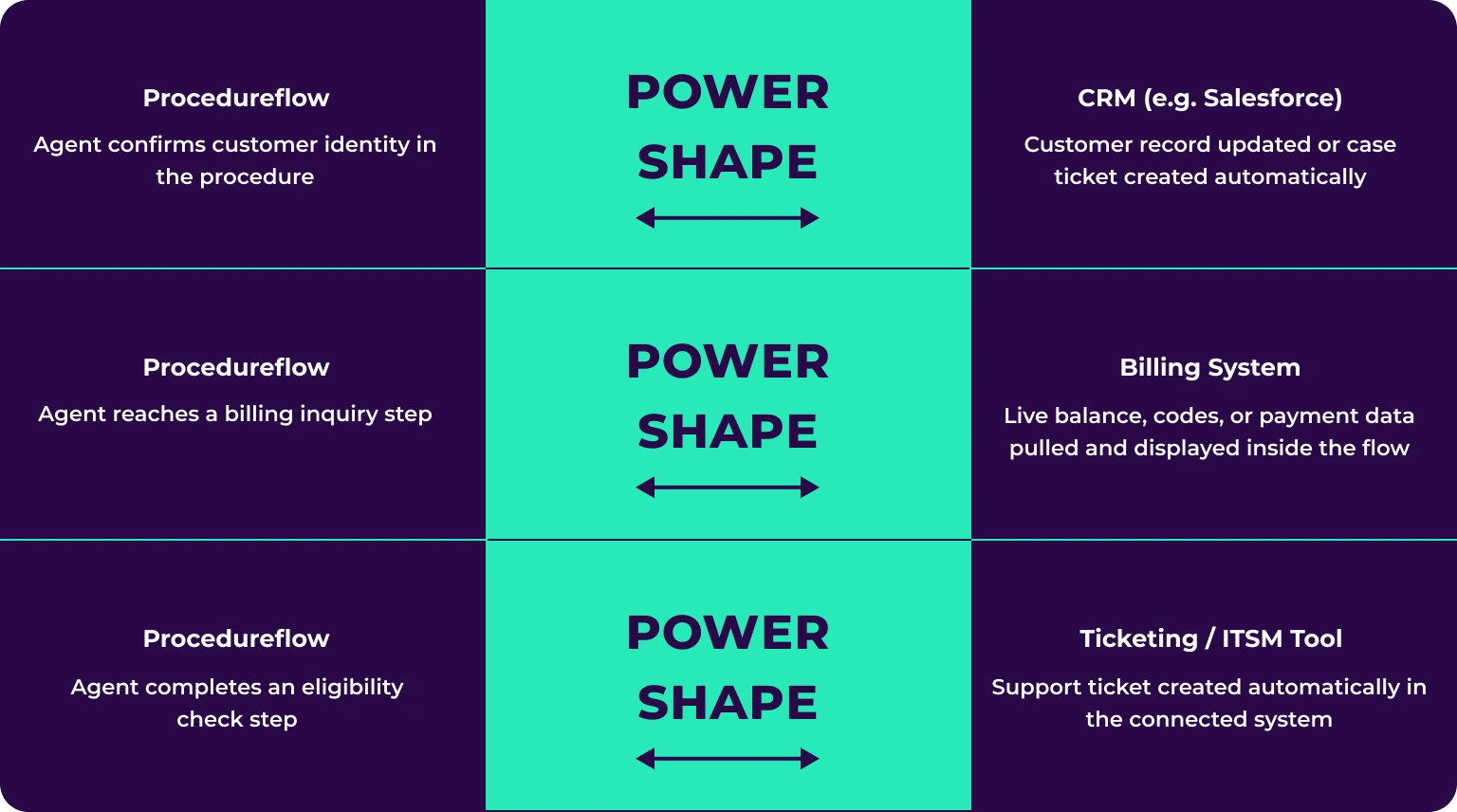
One Power Shape handles all the connection logic. Agents do not configure it or trigger it manually. It deploys across unlimited flows and counts as one shape against your plan allocation.
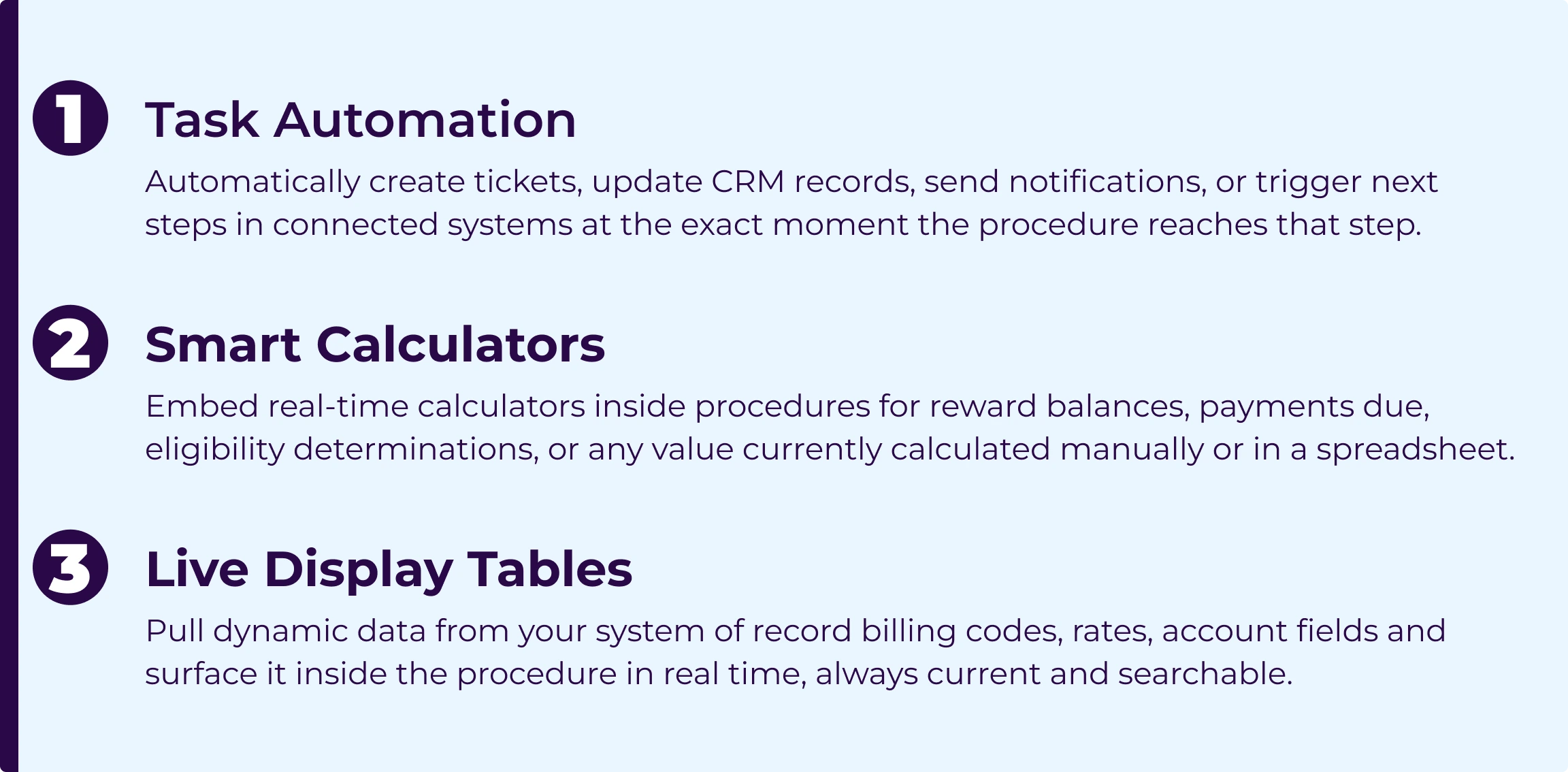
What Can Power Shapes Automate? Three Core Capabilities.
Power Shapes deliver value across three practical categories each targeting a distinct type of friction contact centre agents encounter daily.
Workflow Automation In Depth: What Makes Power Shapes Different
Most automation tools sit beside procedures. Power Shapes are different because the automation is part of the procedure itself executing at the step, not beside it.
Automation fires at the step, not on a schedule
Power Shapes execute precisely when an agent reaches the relevant step in the right procedure, for the right interaction. This means automation is always contextually accurate and agents never need to remember to trigger it.
The procedure is no longer just a guide. With Power Shapes, it becomes the execution environment start to finish, without switching systems.
One step can trigger multiple system updates simultaneously
A single Power Shape can execute several actions at once. Confirming upgrade eligibility can simultaneously create a CRM record, log a note in the ticketing system, and update account status in the billing platform all while the agent reads the confirmation and continues.
Self-contained automation no external API required
For calculations, eligibility logic, or any value computable from information already in the procedure, a Power Shape can be entirely self-contained. The logic lives in the shape. No API call is made. The agent inputs a value; the shape returns the result.
Data flows in both directions
Power Shapes push data out to connected systems and pull data in from them. A display table shape fetches current data from your billing system each time it loads agents always see live information, not a static snapshot.
How Power Shapes reduces average handle time (AHT)
Average handle time is reduced when agents complete tasks without leaving their workflow. Every manual step between systems re-entering data, opening a new tab, navigating to the right record, running a calculation in a spreadsheet adds seconds per interaction. Across a team handling hundreds of calls daily, those seconds become hours. Power Shapes removes those steps at the source, inside the procedure, without changing how agents work.
Before and After Power Shapes
| Scenario | Without Power Shapes | With Power Shapes |
|---|---|---|
| CRM update needed mid-call | Agent leaves the procedure, opens CRM, manually enters data, returns to the flow | Power Shape updates the CRM at that step automatically; agent stays in flow |
| Reward balance calculation required | Agent opens a spreadsheet or separate tool, runs the calculation manually | Calculator Power Shape computes and displays the result inside the procedure instantly |
| Current billing code lookup needed | Agent searches a separate document or billing system; codes may be outdated | Display Table Power Shape pulls live codes from the billing system at load; always current |
| Support ticket needs creating | Agent opens the ticketing tool after the call, re-enters customer details manually | Power Shape creates the ticket with the correct data automatically at the right step |
| Leadership needs consistent execution | Requires manual auditing or spot checks of individual agent behaviour | Automation in the procedure means the standard executes by design consistently, every time |
Infrastructure, Security, and Governance for IT Leaders
All automation runs within your existing environment
Power Shapes operate inside your organisation's existing Procedureflow deployment. There is no external intermediary system, no data leaving your infrastructure boundary, and no shadow IT introduced.
Governance by design, not by oversight
Because automation is embedded inside the procedure, every agent who reaches that step executes the same logic. Compliance is structural. The standard executes correctly because the procedure enforces it not because a supervisor is checking.
IT involvement is scoped, not ongoing
IT engagement focuses on API configuration for connected systems, handled in coordination with Procedureflow's team. There is no new integration infrastructure to build, no middleware to maintain, and no requirement to modify existing tooling.
How to Get Started with Power Shapes Workflow Automation
Power Shapes are available now. The path requires no new platform, no procedure redesign, and no retraining.
1. Identify one flow with a clear automation opportunity
Find the process your team works around every day the manual re-entry, the tab switch, the out-of-flow calculation. That friction point is your starting position.
2. Speak with your Customer Success Manager
Your CSM will map the opportunity against your existing flows, identify the right Power Shape type, and connect you with Procedureflow's engineering team if required.
3. Scope, build, and validate
Procedureflow's team documents requirements, validates them, and develops the shape. For teams building independently, the Power Shapes SDK is available in Beta. All shapes are tested in a sandbox before deployment.
4. Deploy and measure
An Org Admin installs the shape on the relevant entry points. Track impact through handle time, error rates, and process adherence metrics, the baseline is already in your Procedureflow reporting.
Start with one process. See the difference it makes.
Your Customer Success Manager can identify where workflow automation fits in your existing flows and show you exactly what Power Shapes looks like in your environment.
→ Talk to your CSM about Power Shapes